

Guide to Viewing Electronic Invoices on the Italian Revenue Agency Portal
How to view, download, and verify electronic invoices sent and received through the Interchange System (SdI).

Consulting electronic invoices is an essential activity for companies, professionals, tax advisors, and management software providers that need to monitor documents transmitted through the Exchange System (SDI). On the Italian Revenue Agency portal, the dedicated area is called “Fatture e Corrispettivi" (Invoices and Receipts): here you can access issued and received invoices, check transmission status, view details, and download official XML files.
In this guide, we will go step by step through how to navigate the Invoices and Receipts section to retrieve electronic invoices sent and received via the Openapi Invoice APIs.
What is Fatture e Corrispettivi (Invoices and Receipts)
Fatture e Corrispettivi (Invoices and Receipts) is the online service provided by the Italian Revenue Agency, aimed at businesses and professionals (VAT-registered entities). It allows users to manage and consult all data related to electronic invoicing and electronic receipts. It is the operational platform connected to the Exchange System (SDI), where electronic invoices issued and received by VAT holders, companies, and professionals are transmitted and stored.
The most commonly used features include:
- Consultation of issued and received electronic invoices;
- Verification of invoice status sent to the SDI
- Download of XML files and invoice metadata
- Monitoring of notifications (delivery, rejection, failed delivery)
- VAT data management
- Transmission and consultation of daily receipts (electronic sales receipts)
This service is distinct from the “Cassetto Fiscale (Tax Drawer)”, which represents the personal archive of the taxpayer (individual or business) available on the Italian Revenue Agency website. The latter allows centralized consultation of tax documents, declarations, and payments made.
1. Accessing Invoices and Receipts
To quickly access the section dedicated to electronic invoices, we recommend visiting directly Invoices and Receipts rather than going through the homepage of the Italian Revenue Agency portal.
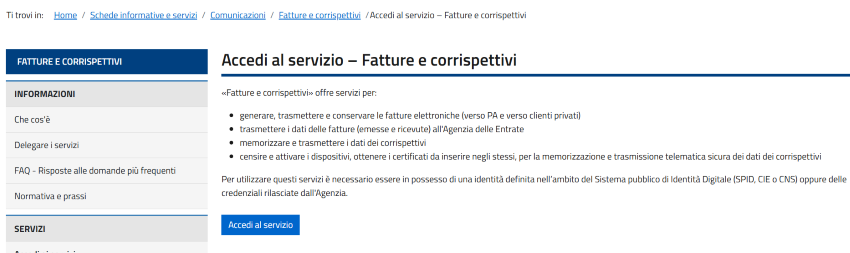
The ways to access the service are:
- SPID
- CIE (Electronic Identity Card)
- CNS (National Services Card)
- Fisconline / Entratel credentials
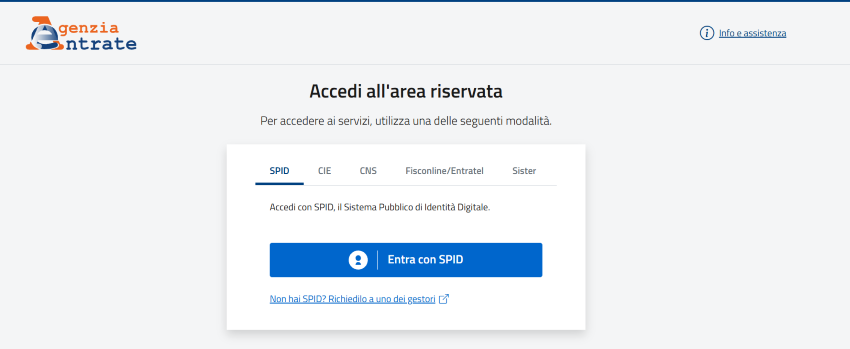
2. Configure the Working Profile
Once logged in, the user must select the profile they wish to operate with:
- Myself: to access services related to your VAT number
- Appointee: if you have been appointed to operate on behalf of the company you work for
- Direct delegation: if you have received a delegation from a client who is a VAT-registered entity
- Guardian: if you need to operate as the legal guardian of the VAT-registered entity (for example, in case of legal incapacity)
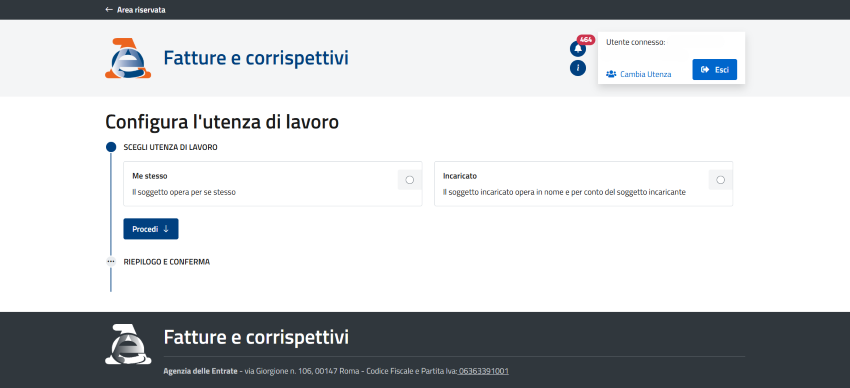
Once the profile is selected, you can choose the VAT number you intend to operate on. Select the user profile associated with the company whose invoices you want to consult.
Once the working profile is configured, you can proceed to the consultation of invoices and receipts by clicking the Proceed button.
3. Select Electronic Invoices and Other VAT Data
Once logged into the Invoices and Receipts portal, several sections will be available. In the “Consultation” section, click on "Electronic invoices and other VAT data".
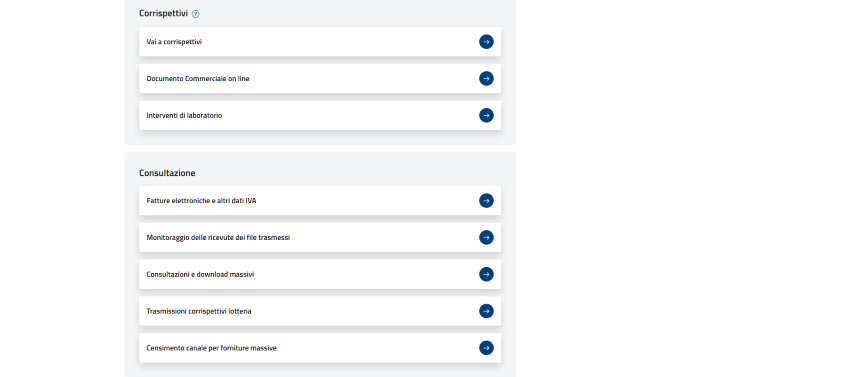
4. Consultation of Electronic Invoices (Issued or Received)
From the Consultation section, select one of the following options:
- Issued invoices: to view the invoices you have sent
- Received invoices: to view the invoices you have received
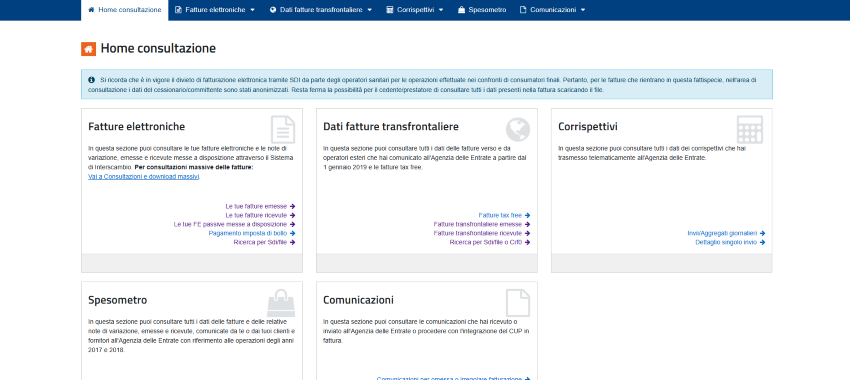
Once one of the two links is selected, you will see the list of available invoices (issued or received) made available through the exchange system for the last quarter or for the selected period using the appropriate filter.
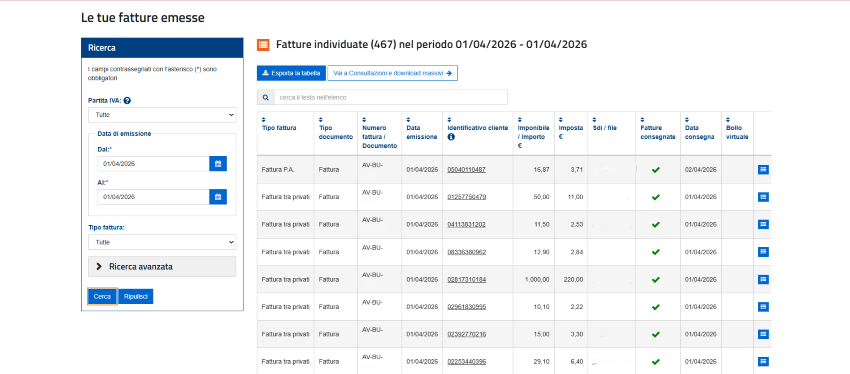
The screen allows users to view, for each row in the table, the main summary data of the document, including:
- invoice number and date,
- tax identification number of the supplier or customer,
- taxable amount, tax amount,
- unique identifier assigned by the Exchange System (SDI) to the invoice XML file and any applicable stamp duty.
By hovering over the subject’s identifier, the corresponding name or company name is also displayed.
By clicking on the magnifying glass icon in the last column, the VAT subject can access the detailed invoice data or download the related XML file.
It is possible to filter the list using parameters such as VAT type, invoice issue date, and invoice type. In addition, through the Advanced Search functionality available in the box, users can select a specific VAT number or tax code, or filter by invoice type or status.
Please note that electronic invoice files correctly transmitted to the Exchange System (SDI) remain available for consultation in the reserved area of the Italian Revenue Agency website until December 31 of the second year following their receipt by the SDI. After that, only the so-called “invoice data” will be available for consultation until December 31 of the eighth year following the submission of the relevant tax return.

RELATED ARTICLES

Carbon free energy for Our Cloud  Low CO2





© 2024 Openapi SpA, a single-member company, under the direction and control of Open Holding Srl.
Viale Filippo Tommaso Marinetti 221 - 00143 Rome - Business Register: 1378273, Share Capital: €50,000.00, VAT Number: IT12485671007, Recipient Code: 'USAL8PV' - Certified Email: 
Openapi is certified in: Quality System **UNI EN ISO 9001:2015** - Data Quality **ISO 25012:2014** - Security Management **ISO/IEC 27001:2022** - Geneder Equality According UNI PdR 125:2022
All prices are net of any VAT, stamp duty, registration fees, or other taxes that may be due. All logos listed on the portal are copyrighted and owned by their respective owners.